Choosing the Protocol - Day 1
 Moaath Al-Bukaai17 Oct 2026 · 34 min read
Choosing the Protocol Before the Walls Close: A Field Guide to KNX, DALI, DMX512, Zigbee, Z-Wave, Matter and the Rest
Day 1 of the Essentia pre-sales engineer training, written up for system integrators and engineers.
Introduction: why we started with protocols
Our pre-sales training ran for three days with about ten Essentia colleagues. Day one was protocols, and not because protocols are the exciting part of a smart home. They come first because the protocol is the first technical decision a pre-sales engineer makes, and it is the one you cannot undo once the walls are closed.
This article follows the Day 1 deck slide by slide and expands on each point. Where a number or a date can be checked, I link the source right in the text. Where a figure comes from our own training material and I could not find a public source for it, I say so, and I list those figures together at the end. The article is written for integrators and engineers, so it keeps the numbers.
Here is the route we took:
• Why the protocol matters to a pre-sales engineer
• The foundations: protocols, topologies and wiring layouts
• The wired protocols in depth: KNX, by.me, DALI, 0-10V, ELV and DMX512
• The wireless protocols: Zigbee, Z-Wave, Wi-Fi and Bluetooth Mesh
• Where it is heading: Thread and Matter
• A comparison table, a decision framework and three practice scenarios
Why the protocol is the first decision
You will select the protocol before the client sees a single fixture. A pre-sales engineer translates a client's lifestyle and budget into a technical backbone. Get that wrong and the mistake is expensive and hard to undo, because it is usually discovered after the walls are closed.
We framed it as three situations.
Wrong protocol chosen. The solution fails at implementation, the sale fails, and the handover fails. One bad choice at the start travels all the way to the end.
Cabling missed at the design stage. KNX and DALI need their containment pulled before the finishing works. If it is missing from the quote, it becomes a costly change order later.
Right protocol, right project. Matching reliability, budget and scale correctly builds trust, and that trust turns into repeat and referral business.
The cable follows the protocol
The most useful way I know to explain this is with two clients.
The first client only wants lighting control. No AC control, no curtains, no energy management. For him, KNX is more than he needs. DALI is cheaper and more practical, and its cabling is simpler, so you design the site around DALI cabling.
The second client wants lighting, AC, curtains and energy management. He needs a building-wide bus. If his site has already been wired for DALI only, none of the extra functions is possible. DALI cannot drive his AC and curtains, and KNX devices cannot sit on a DALI cable. Neither protocol can rescue that site without opening the walls again.
That is why a proposal fails when the pre-sales engineer picks the wrong protocol. The cabling on site depends on the protocol in the proposal, so the protocol has to be right before the electrical contractor finalizes his drawings.
Foundations: what a protocol really is
Every protocol is an answer to three questions.
1- Medium. What physical channel carries the signal? It could be twisted-pair cable, mains wiring, 2.4 GHz radio, sub-GHz radio or a control voltage.
2- Topology. How are the devices arranged and connected? The options are bus, star, mesh or point-to-point.
3- Addressing. How does a controller reach one specific device? Through an individual address, a group address, a broadcast, or no addressing at all, as in analog control.
A tip for pre-sales: before you propose anything, ask the client which of these constraints matters most. For the medium, it is the budget for cabling. For the topology, it is whether the job is a single room or the whole house. For addressing, it is whether he needs scenes.
The four connection patterns
Learn to recognize four shapes, because every protocol maps to one of them.
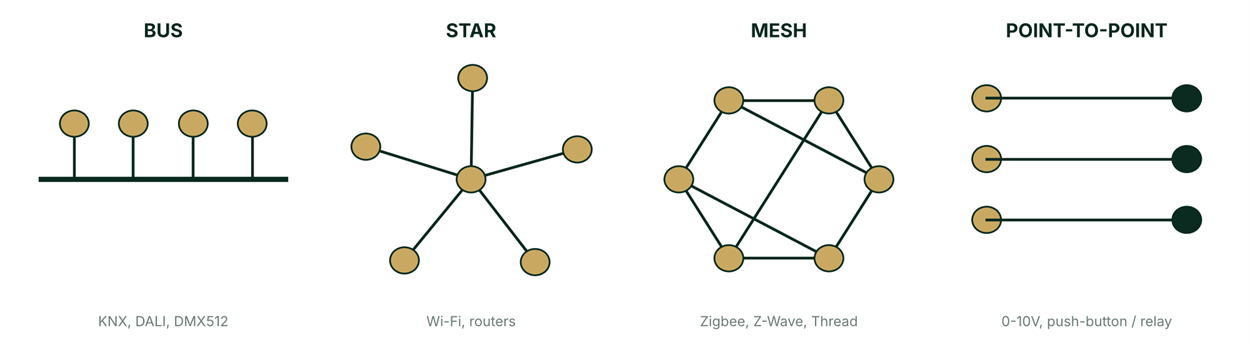
A bus is one shared line that every device taps into. KNX, DALI and DMX512 are buses.
A star connects every device back to one central hub, which is how Wi-Fi and most routers work.
A mesh has devices relaying for each other over self-healing paths, which is how Zigbee, Z-Wave and Thread work.
Point-to-point gives each connection its own dedicated pair with no shared line, which is how 0-10V and push-button or relay circuits work.
Wiring layouts inside a bus
KNX and DALI do not care how you physically route the cable, as long as there is no loop. Three layouts are allowed.
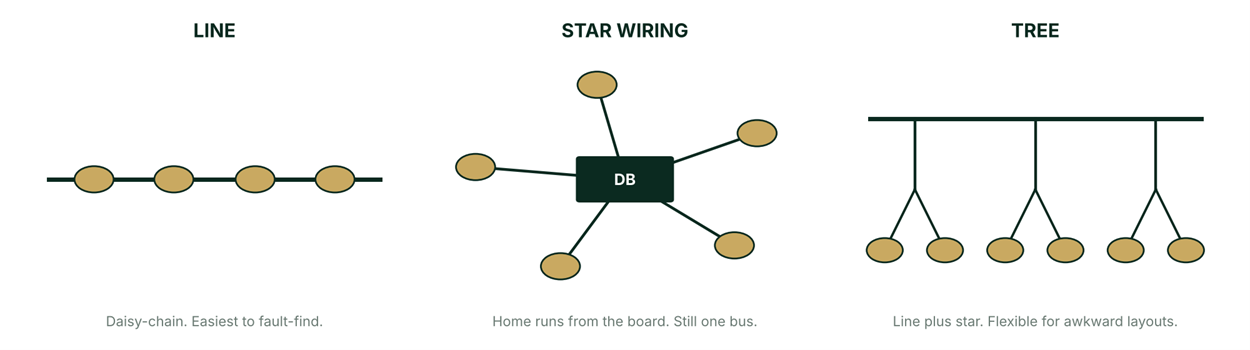
Line is a daisy chain, device to device. It is the easiest to fault-find and the recommended default.
Star wiring means home-run cables from a distribution board to each device. It is still one shared bus, with no active routing at the hub.
Tree is a mix of the two, branches off branches, and it is flexible for awkward layouts.
The no-loop rule is consistent across the sources. Wikipedia's KNX entry states that a KNX wired network can use tree, line and star topologies mixed as needed, and that ring topologies are not supported. Ivory Egg's KNX topology guide puts it as "a loop cannot be created at any point of the bus". For DALI, the DALI Alliance's introduction says free wiring is allowed, with daisy-chain or star connections or combinations of them, and that a closed loop should not be used.
Not every bus is this forgiving. Modbus (RS-485) and DMX512 must be wired strictly in line, and a star tap causes signal reflections and communication errors. Point-to-point protocols such as 0-10V and push-button circuits have no wiring flexibility at all, because every connection is a dedicated pair between exactly two points.
Wired protocols: what you are really trading
Wired protocols are the backbone of long-life, high-reliability projects. Here is what you gain and what you pay.
What you gain
• Rock-solid reliability. There are no dropouts from Wi-Fi congestion, walls or radio interference.
• They are harder to compromise. There is no wireless signal to intercept, and the data stays on a physical, isolated bus.
• No batteries and no dead sensors, because devices draw power from the bus or the mains.
• Long service life, often decades with minimal maintenance once correctly installed and commissioned.
What you pay
• Higher upfront cost. Cable, containment and skilled labour add up.
• It has to be designed in from the start. Retrofitting into finished, occupied walls is disruptive and costly.
• Less flexibility after handover. Moving a keypad means pulling new cable, not re-pairing an app.
• A longer installation timeline, because commissioning, such as ETS programming, takes real project time.
This is the universal engineering trade-off between installation cost and flexibility on one side and reliability and security on the other, and it is the one a pre-sales engineer has to communicate to a client who is weighing wired against wireless. It comes from our training position and field experience rather than from a single published study. I looked for a neutral comparison study and did not find one I could verify, so I am not citing one.
KNX: the open standard for whole-building integration
Where it came from
KNX began with manufacturers who wanted their products to work together. The KNX Association's own history page says that in 1990 a small number of European electrical manufacturers, including Siemens, Gira, Jung, Merten and Berker, founded the European Installation Bus Association (EIBA). The first edition of the EIB open specification followed in 1991, and the first EIB devices were certified in 1992.
In May 1999 the organizations behind EIB, BatiBUS and EHS (the European Home Systems protocol) merged to form the Konnex Association, later shortened to KNX Association. KNX was accepted as a European standard (CENELEC EN 50090) in 2003 and approved as an international standard (ISO/IEC 14543-3) in 2006, according to the same page. It reports more than 500 manufacturer members, more than 8,000 products and more than 135,000 certified installers.
How it works
KNX is a decentralized bus. Every sensor and actuator carries its own intelligence, so there is no single point of failure. If a central server or visualization dies, the wall switches and actuators keep working, because the logic lives in the devices. That is a strong selling point for reliability-focused clients.
It runs on twisted-pair cable (TP1 is the most common), on KNX IP over Ethernet, or on KNX RF. Wikipedia's KNX entry lists twisted pair, powerline, RF and IP as the media, notes a TP1 signalling speed of 9600 bit/s, and says all products carrying the KNX logo are programmed through one common, vendor-independent tool, ETS. The topology is free: line, star or tree, with no loops. KNX also has encryption through KNX Data Secure and IP Secure.
Two practical points. ETS licensing and KNX-certified integrators are required, so this is a service Essentia provides and not something a generalist electrician can safely do. And the track record is long: more than 30 years on the bus.
When to recommend it, and when to think twice
Recommend KNX when:
• It is a new build or a major renovation, so the cabling can be pulled before the finishing works.
• The scope is large or whole-building, with lighting, shading, HVAC and security integrated together.
• The client expects decades of reliable service with minimal maintenance callbacks.
• It is 5-star hospitality, government or high-net-worth residential, where downtime is unacceptable.
Think twice when:
• It is a finished, occupied property with no budget or access to open the walls.
• The job is small, single-room or short-turnaround.
• The budget is tight, or the client has a short ownership horizon, such as a rental unit.
• The client prioritizes speed of installation over long-term robustness.
The Essentia point to repeat to every client and contractor is timing. KNX cabling must be planned at first fix, before the electrical contractor finalizes the drawings. Once the walls close, adding KNX becomes a major, disruptive change order. This is the single biggest reason KNX proposals fail late in a project.
Design rules: the numbers to know before you quote
Rule | KNX figure | Source |
Devices per line, classic (TP1-64) | Up to 64 devices; most KNX power supplies are 640 mA | |
Devices per line, newer (TP1-256) | Up to 256 devices without line repeaters; normal power-supply load calculations still apply | |
Current budget | Roughly 10 mA average per device when sizing a supply (640 mA divided by 64 devices) | Training rule of thumb |
Larger supply | A 1280 mA supply exists, for example a Gira unit, and commonly supports up to 128 devices at that budget | |
Power supplies per line | Maximum two; minimum separation as per the manufacturer's datasheet, commonly about 200 m of cable | Training figure; separation per Chipkin's KNX topology course |
Cable distances | 350 m from supply to any device, 700 m between any two devices, 1000 m per line segment | |
Scaling | Line couplers link up to 15 lines; main lines join into areas through a backbone line, up to 15 areas | Lines per Chipkin; the 15-area count is a training figure |
On the redundancy rule: most installers meet the separation between two supplies naturally, by putting one supply at the ground-floor distribution board and a second at an upper-floor board. The old "15 devices apart" or "10 m" rules of thumb are wrong. The real constraint is the manufacturer-specified supply separation.
A caution on the sources. The Chipkin course predates the TP1-256 topology, and the KNX Association article is from 2019, so check the current KNX specification before you print any line limit on a proposal.
Once a line reaches its device or power budget, add a line coupler to link it to the main line. Main lines join into areas through a backbone line. In the KNX Association's TP1-256 article, the area line and backbone line can also hold 256 devices under the newer topology, though that still has to include any line couplers on them. This is how a single KNX installation scales to tens of thousands of devices.
An example single-line diagram
One bus line carries sensors and a webserver alongside actuators that switch the actual loads.
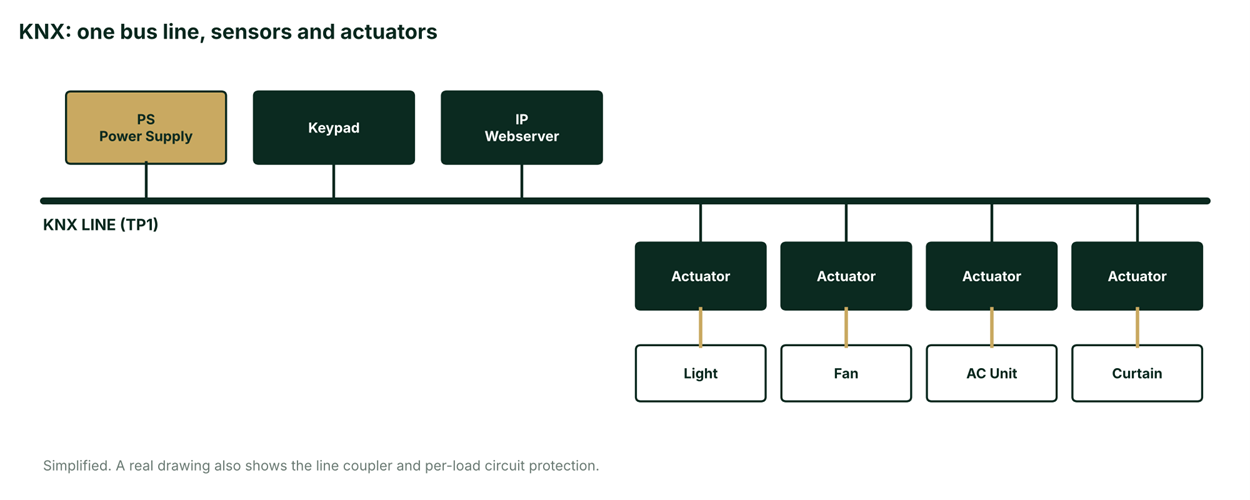
This is simplified for training. A real KNX drawing also shows the line coupler, dedicated circuit protection per load, and compliance with local wiring regulations.
KNX cable is its own cable
This was one of the questions that took the longest in the room. KNX uses its own certified bus cable with its own specification. A typical example is the green, halogen-free 2 x 2 x 0.8 mm cable, rated at 300 V, with a red and black pair and a yellow and white pair. Zennio's KNX cable datasheet gives those figures. The datasheet itself lists only CE conformity and does not name a KNX certification mark for the cable, so confirm the approval status of the specific cable you buy. The cable comes in one-pair and two-pair versions, and in the two-pair version the second pair is normally left spare. KNX cable also has polarity, so the bus pair has to be connected the right way round.
DALI is different, as the DALI section below shows.
by.me: KNX-based, but not KNX
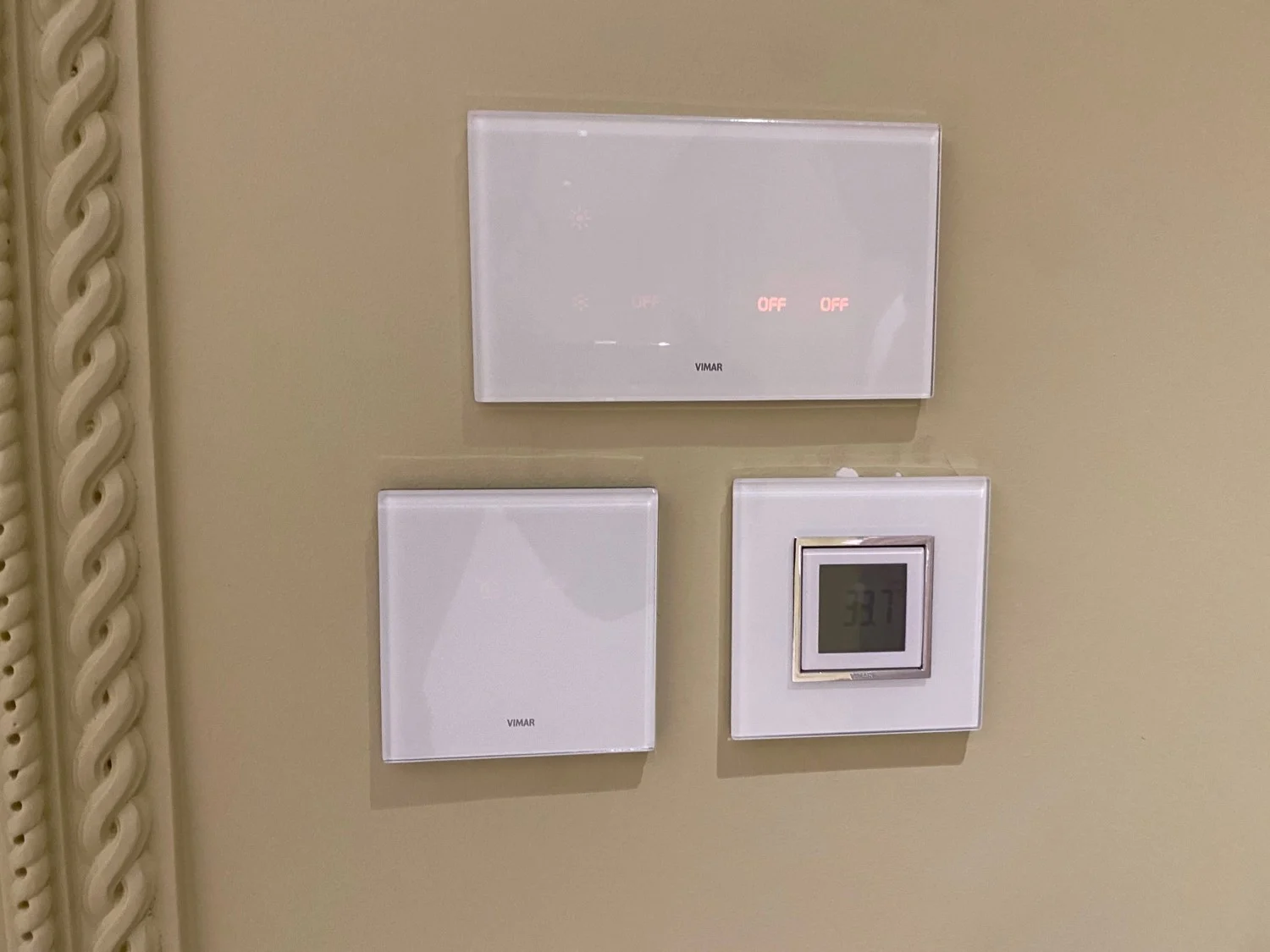
by.me is Vimar's own bus system, and you need to know it when you inherit or extend one. It was developed by Vimar in Italy as a lower-cost bus alternative. It uses the same physical bus concept as KNX, twisted pair with distributed intelligence across the devices, and it is marketed as KNX-compatible. It can coexist with real KNX on the same project.
What is different matters more. by.me is not KNX-certified. It is a proprietary variant, sometimes described as a fork of KNX. It is commissioned through Vimar's own tools, the central by.me unit or the View Pro app, and not through ETS. Its addressing is hex-style, so the telegrams are not identical and devices do not mix freely on the same line.
What the public sources say, and what they do not. Vimar's page on its By-me Plus KNX Secure routers says the router translates all messages from the By-me system into KNX messages and back, with ETS used to configure the integrations with other KNX devices, and that the View Pro app is used to replicate the same configuration across rooms. Vimar positions these routers for tertiary structures such as hotels. The page does not claim that by.me itself is KNX-certified. The "fork" description comes from a user thread on the openHAB community forum, which is a user claim, not a Vimar statement. The same thread has balanced user experience, with one user reporting that the system was stable but saw limits in a non-IP system once many smart devices were involved.
For Essentia the rules are simple. A dedicated by.me/KNX router bridges the two systems, so an existing by.me installation can still exchange data with genuine KNX devices. If a client already has by.me, do not assume you can drop generic KNX devices on the same line. And never quote by.me as certified KNX on a spec sheet.
DALI: the digital language of dimmable lighting
Where it came from
DALI came from the lighting side. It was designed as a digital successor to 1-10 V and 0-10 V lighting control, and as an open alternative to several proprietary protocols, by a consortium of lighting equipment manufacturers, according to Wikipedia's DALI entry, which dates its introduction to the 1990s. A manufacturer fact sheet on DALI says the standard was developed by Tridonic together with well-known manufacturers of operating and control devices. In our training notes, the early non-addressable precursor, DSI, was launched by Tridonic in 1991, with ballast makers including Philips, Osram and Helvar behind the vendor-neutral successor. I could not confirm the 1991 or 1998 dates in a public source, so treat them as training figures.
The standard became IEC 62386. DALI-2 restructured it so that control devices, meaning keypads, sensors and application controllers, are certified for the first time, where the original DALI certified drivers only. Our deck dates that restructuring to 2014. On the certification side, Wikipedia records that the Digital Illumination Interface Alliance (DiiA) has certified DALI products since 9 June 2017, and the DALI Alliance introduction says the first DALI-2 products, LED drivers, were certified in September 2017. The same Wikipedia entry dates D4i, the extension that adds IoT-ready luminaire data, to November 2019.
How it works
DALI is purpose-built for lighting. It addresses individual drivers and ballasts, not general building functions. It runs on a two-wire, low-voltage, polarity-free bus, and each device has its own address.
It is two-way. Application controllers can control, configure or query each device through bi-directional data exchange, and Wikipedia's DALI entry lists status queries that include control-gear failure and lamp failure. That feedback is the reason fault reporting and energy monitoring are possible. DALI-2 certification standardizes the control devices too, which gives guaranteed multi-vendor interoperability, and DT8 covers tunable white and colour control.
The key contrast to draw: DALI is lighting-only, KNX is building-wide. In most Essentia projects DALI is the last mile. A KNX system's DALI gateway addresses the individual fixtures in a room, while KNX handles the overall building logic and the integration between trades.
When to use it, and when to think twice
Recommend DALI when:
• More than a handful of dimmable fixtures need individual addressing or scene control.
• Commercial or hospitality lighting needs fault reporting and energy monitoring.
• The design has tunable-white or colour-changing architectural lighting (DT8).
• The client wants to reprogram scenes later without rewiring, because the addresses live in software.
Think twice when:
• It is a handful of simple on/off or single-zone dimmed circuits, where plain dimmers or 0-10V may be cheaper.
• There is no budget for DALI-capable drivers, which cost more than standard triac-dimmable ones.
• The client only wants physical switches and has no interest in scenes or reporting.
DALI and KNX are usually proposed together and not as alternatives. DALI handles the lighting layer, and KNX, or GRMS, ties it into the rest of the building. Make sure the bill of quantities prices DALI-capable drivers, not standard dimmable ones, wherever DALI is quoted. The DALI-2 versus DALI-1 distinction matters for cross-vendor compatibility of switches and sensors, so check it on any mixed-brand bill of quantities.
Design rules: the numbers to know before you quote
Rule | DALI figure | Source |
Addresses | 64 control-gear addresses per line. The DALI Alliance describes DALI-2 as up to 64 control gear plus up to 64 control devices per subnet; our deck treats 64 as one shared limit for the design | |
Groups and scenes | Each device can belong to up to 16 groups and up to 16 scenes | |
Bus current | Maximum 250 mA per line, at typically 16 V DC | |
Current budget | Roughly 2 mA average per device when checking headroom against the 250 mA ceiling | Training rule of thumb |
Power supplies | Exactly one DALI power supply per line | |
Voltage drop | Maximum 2 V across the line | |
Cable length | About 300 m at 1.5 mm², less on thinner cable | |
Topology | Line, star or tree. No rings or closed loops | |
Polarity | Not required |
Three notes on the table.
First, the cable length. The training figures for thinner cable are about 200 m at 1.0 mm² and about 100 m at 0.5 mm². I could not find those exact figures published, but the arithmetic supports them. The DALI fact sheet builds its calculation from a 2 V limit, a 250 mA current and copper conductivity of 56 m per ohm per mm². Working that through gives a theoretical reach of roughly 336 m at 1.5 mm², 224 m at 1.0 mm² and 112 m at 0.5 mm², which is why the practical figures are quoted as 300, 200 and 100 m. That calculation is mine, not a published table, so size real cable from the actual current on the line.
Second, the address count. Sources differ on whether the 64 limit covers control gear only or control gear plus control devices. For quoting, the safe design rule is to count drivers against 64 and keep the total current inside 250 mA, and to confirm the exact limit in the master or gateway datasheet.
Third, polarity. DALI is polarity-free, which is why it runs on ordinary electrical cable. One manufacturer installation guide, Trilux's DALI installation page, adds a caveat that polarity should be observed when several DALI-2 control devices operate in parallel multi-master mode. Check the datasheet of the control devices you specify.
DALI cable is ordinary cable
This is the other half of the KNX cable question. DALI runs on normal electrical cable, two wires with no polarity. Reverse them and it still works. The DALI fact sheet adds a useful warning: a thin control cable of the 2 x 2 x 0.8 type gives only 0.5 mm² and is not suitable for DALI installations because of its low test voltage. DALI wants mains-rated cable. That single difference between KNX and DALI cabling changes how the electrician prices and pulls the job.
Groups and scenes
The second source of confusion in the room was the difference between a group and a scene in DALI. A group is who. You put fixtures in a group, and a keypad talks to the group. A scene is what level. A scene stores a set of output levels, for example group A at 100 per cent and group B at 30 per cent. Per Wikipedia's DALI entry, a device can be a member of one to 16 groups and up to 16 scenes, and each device stores up to 16 programmable output levels as scenes. Groups organize the fixtures. Scenes store the mood.
More than 64 devices: how do you link two lines?
The third question was about the limit. If I have two DALI lines, how do I link them? You do not link them by joining the cable. Each line has its own dedicated power supply, and DALI does not allow two supplies on one line, unlike KNX. When you need more than 64 addresses, or more current than 250 mA allows, you add another DALI line with its own supply and bridge control between the lines with a gateway or a controller. On a KNX-led project that bridge is usually the KNX-DALI gateway, and KNX carries the logic across all the lines. Never parallel two power supplies on one DALI line.
A standalone DALI line, with no KNX
Every device on a DALI line shares one broadcast bus. A phone app can join through a gateway, with no wider building system.
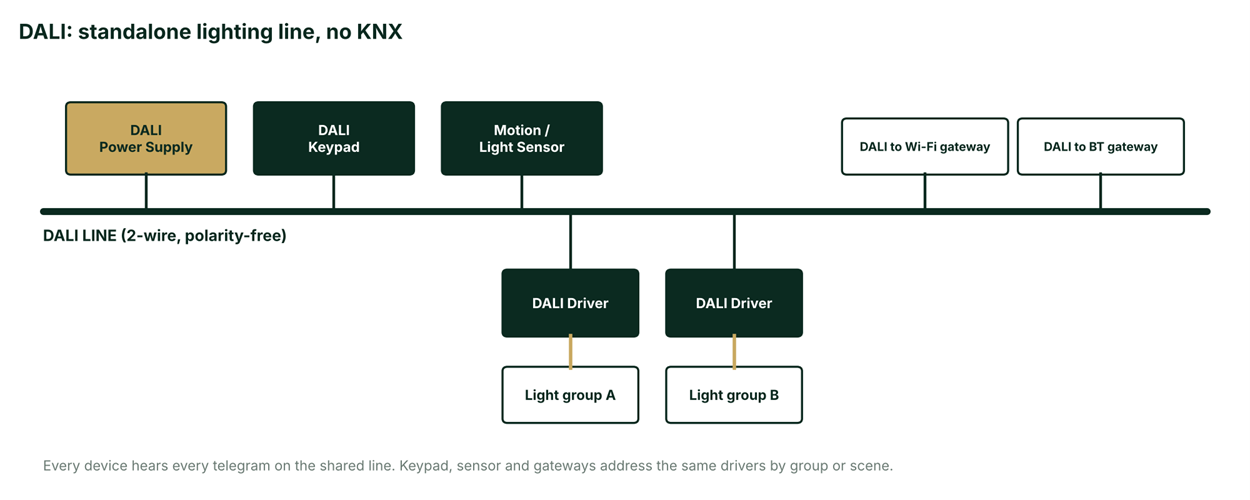
All the devices hear every telegram on the shared line. The keypad, the sensor and the gateways all address the same drivers by group or scene.
KNX and DALI together: the integrated lighting layer
The gateway translates KNX group addresses into DALI commands. KNX handles the building logic and DALI addresses each fixture.
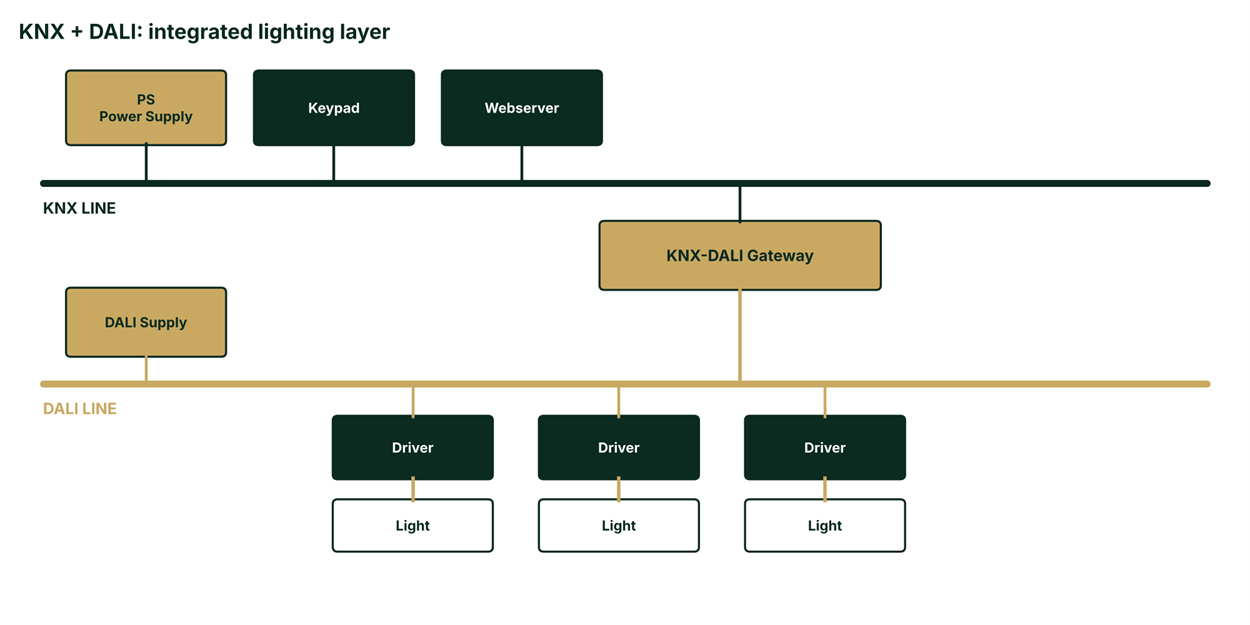
This is the pattern behind most Essentia lighting scopes. KNX, or GRMS, provides whole-building logic and the integration with other trades. A KNX-DALI gateway hands the dimming and scene addressing of the fixtures to a DALI line.
0-10V and 1-10V: simple analog dimming
0-10V is the original analog dimming standard and it long predates DALI. DALI was created to replace it with a digital, addressable alternative, and Wikipedia's DALI entry describes DALI exactly that way.
An analog control voltage, 0-10V or 1-10V to avoid ambiguity at zero, tells a driver how bright to be. It is point-to-point, the same as a push-button or relay circuit, with no shared bus and no addressing. All fixtures wired to the same control pair dim together as one group. There is no way to reach one fixture individually over the wire, and there is no feedback. Cost is low.
Recommend it when a simple dimming zone, such as one room dimmed together, fits the brief; when the budget does not stretch to DALI-capable drivers; or when you are working with existing 0-10V-compatible fixtures on site. Think twice when the client wants individually addressed fixtures or scene control, when fault reporting or energy monitoring is expected, or when zoning may need to change later, because 0-10V zoning is fixed by wiring and not by software.
It is also the usual fallback when a client loves the idea of DALI but the budget does not support DALI drivers.
ELV and dry-contact relay control: the baseline every project touches
ELV push buttons and relay panels are simple physical on/off switching. They are point-to-point, exactly like 0-10V: each switch is wired directly to its own relay or circuit, with no shared line, no addressing and no scenes. The typical role is utility and back-of-house.
It is still the right tool in the parts of a project that do not need smart behaviour. Recommend it for utility rooms, staff or back-of-house areas, and garden or perimeter circuits; as a budget carve-out within a larger smart-home proposal; and as a manual override circuit alongside a smart system. Think twice when the client wants scenes, scheduling or remote control in that space, or when the area is likely to be upgraded later, because retrofitting relay-based rooms is disruptive.
One piece of sales advice: this is often the first thing to upsell into DALI or KNX once a client sees the rest of the smart-home proposal. Treat it as an opportunity and not just a fallback.
DMX512: real-time control for façade, pool and effects lighting
DMX512 comes from the theatre. Wikipedia says the standard was created in 1986 by the Engineering Commission of the United States Institute for Theatre Technology (USITT), with revisions in 1990, and that ANSI approved the revised DMX512-A in 2004. SparkFun's introduction to DMX gives the same 1986 origin.
It is channel-based. A universe is 512 channels, each carrying a value from 0 to 255, according to Wikipedia. It is a multi-drop bus daisy-chained over 5-pin XLR cable (the DMX512-A standard specifies a five-pin XLR connector, though SparkFun notes that 3-pin XLR cable is occasionally used). At the physical layer it is a unidirectional RS-485 signal, which means no feedback from the fixtures. An extension called RDM adds a return path on some equipment, but you should not assume it.
Wiring is strictly in line. Wikipedia and SparkFun both describe a 120 ohm termination resistor fitted at the far end of the signal cable, and no star taps. Our deck describes a terminator at each end of the chain. Follow the manufacturer's installation guide for the controller and fixtures on your job, and check where each one expects its termination.
Recommend DMX512 for façade, landscape or pool lighting with colour-changing (RGB or RGBW) fixtures; for feature walls and entertainment-style lighting scenes and shows; and when the project already includes a lighting controller or a DALI/DMX gateway. Think twice for general everyday room or task lighting, where DALI and KNX give feedback and better switch-level control, and when the project has no colour or effects lighting at all. DMX does not belong with home automation in the interactive sense, but it very much belongs in architectural façade work.
Wireless protocols: fast, flexible retrofit with different trade-offs
What you gain
• Fast, low-disruption installation with no walls opened, which is ideal for finished or occupied properties.
• Lower upfront cost, because no containment or structured-cabling budget is needed.
• Incremental scaling, one device at a time, whenever the client's budget allows.
• Devices can be moved or re-paired later without an electrician on site.
What you give up
• Shared radio spectrum. 2.4 GHz protocols (Zigbee, Wi-Fi and Bluetooth) can interfere with each other and with a neighbour's devices, and even sub-GHz Z-Wave is not immune to every interferer.
• Range and wall penetration vary by protocol and construction, and thick or metal-lined walls degrade performance measurably.
• Battery-powered sensors need periodic maintenance, which means a battery swap someone has to remember.
• Security depends on the manufacturer's implementation, and it has historically been more variable than a closed physical bus.
For Bahrain this matters, because our construction is dense concrete and block. Our training notes cite lab data showing sub-GHz Z-Wave penetrating masonry noticeably better than 2.4 GHz Zigbee. I could not trace that to a lab study I could verify. What I can cite is a retailer comparison, Vesternet's Z-Wave vs Zigbee guide, which describes better wall penetration for Z-Wave because of its lower frequency but gives no measured figures. For a large retrofit, survey the site before committing.
Zigbee: low-power mesh
Zigbee is a low-power mesh and the largest consumer smart-home ecosystem. Our deck dates the Zigbee Alliance to 2002 and IEEE 802.15.4 to 2004, with governance now under the Connectivity Standards Alliance. Vesternet confirms the Alliance's current name and says Zigbee operates on the 2.4 GHz band, the same one used by Wi-Fi and Bluetooth, and that mains-powered devices act as repeaters in a self-healing mesh. It states a theoretical capacity of up to about 65,000 devices, which in practice is bounded by the coordinator. Typical range is about 10 to 20 m per hop indoors, a training figure.
Recommend Zigbee for finished, occupied properties where cabling is not possible; phased or incremental smart-home add-ons; and lighting-focused wireless deployments on a tight timeline or budget. Think twice for large villas or palaces that need rock-solid, interference-free performance; for dense concrete or metal construction or a congested 2.4 GHz environment without a survey; and when the client considers this permanent infrastructure he never wants to revisit.
Z-Wave: sub-GHz mesh
Z-Wave was created in 2001 by Zensys of Denmark and is now governed by the Z-Wave Alliance under Silicon Labs, per our deck. Vesternet states that Z-Wave operates on a sub-GHz band, specifically 868.42 MHz in Europe, supports up to 232 devices with up to four hops, and reaches up to 100 m in open air. Our training figure for indoor range is about 30 to 40 m per hop. Z-Wave avoids the crowded 2.4 GHz band entirely, and its stricter certification gives it a reputation for tighter interoperability between brands. Newer Z-Wave Long Range extends the node count to thousands.
Recommend it for retrofit projects that want less RF interference than 2.4 GHz; for scopes with meaningful smart-lock, sensor or access-control content; and for mid-size villas where full KNX cabling is not in budget. Think twice for very large commercial deployments that need more nodes than classic Z-Wave comfortably supports; when the client already has a heavy Zigbee or Matter ecosystem; and when regional product and frequency availability has not been confirmed for Bahrain and the GCC. That last check is a hard rule for us: always verify the regional frequency certification of the specific Z-Wave products you are quoting, because frequency allocation varies by region and not every product line is certified for the GCC.
Wi-Fi: in every home, but not an automation backbone
Wi-Fi is IEEE 802.11, ratified in 1997. It was not built for home automation, but it is universally present. It is a star topology, so every device talks directly to the router, with no local mesh between devices, and most devices connect straight to a cloud service. It needs no separate hub and no extra infrastructure, because the client's home Wi-Fi already exists. Power draw is higher.
Recommend it for single, quick-add devices such as a smart plug, a camera or a speaker; when the client wants zero hub or subscription overhead; and for a fast demo or proof of concept. Think twice for whole-home lighting control, where too many Wi-Fi devices crowd the router and fragment the app experience; for battery-powered sensors, where Wi-Fi's power draw gives poor battery life compared with Zigbee or Z-Wave; and for any requirement of guaranteed local or offline operation.
A common client question deserves a rehearsed, simple answer: "My house already has good Wi-Fi, why not just use Wi-Fi bulbs everywhere?" The answer is router congestion and app fragmentation.
Bluetooth and BLE Mesh: hub-free, short range
Bluetooth was introduced in 1998, according to our deck. The Bluetooth SIG's own blog says the Bluetooth Mesh specification was released in July 2017, enabling many-to-many communication and hub-less mesh networks, which is why it suits lighting and sensor control. Note that the SIG's post is promotional, and its lighting claims come from vendors.
A phone can talk directly to nearby fixtures, so commissioning is simple and cost is often the lowest of the wireless options. Range is the shortest. Implementations and ecosystems vary more by vendor than Zigbee or Z-Wave do, so check each product line individually.
Recommend it for single-room or small-zone retrofit lighting control, a quick demo or showroom setup, and cases where a manufacturer's BLE ecosystem fits the fixtures already specified. Think twice when whole-villa automation is required, when the client wants an always-on local controller and not phone-dependent control, and when long-range or multi-floor coverage has not been verified for that product line.
Where the industry is heading: Thread and Matter
Thread and Matter are two layers, and it helps to keep them apart. The Thread Group describes Thread as an IP-based mesh networking transport layer for low-power smart-home and building products, with capabilities such as border routers and IPv6 connectivity. The same post, from December 2022, marks the release of Matter 1.0, developed by the Connectivity Standards Alliance, and the release of Thread 1.3.0 supporting Matter. So Thread is the network layer and Matter is the application standard on top, running over Thread, Wi-Fi or Ethernet. Together they let devices from different brands be controlled by any Matter-compatible app or hub, with no more one-app-per-brand. Our deck dates the Thread Group to 2014.
Where does that leave professional lighting in October 2026? MatterAlpha's January 2026 explainer says Matter 1.4, 1.4.2 and 1.5 have been released. Basic on-off, dimming and colour temperature are now standard across Matter lighting, but addressable RGBIC control is not defined and scene and group synchronization are weak. It treats Matter 1.6 as a rumour, so I am not claiming anything about it.
So the position stays the same. Recommend Matter when the client values the flexibility to use his preferred voice assistant or app ecosystem, when consumer-grade devices such as locks, sensors and bulbs sit alongside a main automation backbone, or in a phased, forward-looking project where future-proofing is a stated priority. Think twice when the client needs certainty today and not a still-maturing standard, when the lighting is architectural-grade tunable and needs DALI DT8-level control, and for heavy building-management functions such as HVAC and shading logic, which Matter does not cover as deeply as KNX. Use it in the conversation about future-proofing. Do not sell it as the lighting backbone yet.
One development worth watching on the wired side. At Light + Building in March 2026 the DALI Alliance reported its first certified DALI+ bridge, which connects wireless DALI+ with wired DALI, according to EdisonReport and the Alliance's own press release. Wireless DALI is coming, but a bridge is still needed to talk to today's wired DALI-2 and D4i gear, so nothing in the design rules above changes yet.
The master comparison
Keep this table open on your phone during client conversations.
Protocol | Type | Topology | Range | Best for |
KNX | Wired | Bus | Whole building | Large, permanent, high-reliability projects |
DALI (DALI-2) | Wired | Bus | Per lighting line | Individually addressed, scene-based lighting |
0-10V / 1-10V | Wired | Point-to-point | Per zone | Simple budget dimming zones |
ELV / relay | Wired | Point-to-point | Local circuit | Basic on/off, utility and back-of-house |
DMX512 | Wired | Bus | 512 channels per universe | Façade, pool and effects lighting |
Zigbee | Wireless | Mesh | About 10 to 20 m per hop | Retrofit lighting, phased smart home |
Z-Wave | Wireless | Mesh | About 30 m per hop | Retrofit, security and access-heavy scopes |
Wi-Fi | Wireless | Star | Router-dependent | Single quick-add devices, cameras |
Bluetooth / BLE Mesh | Wireless | Mesh | Short range | Single-room retrofit, hub-free control |
Thread + Matter | Standard | Mesh (IP) | Whole home | Multi-brand, app-agnostic future-proofing |
The decision framework: nine questions
Before you recommend a protocol, ask these nine questions.
1. Is it a new build or major renovation, or an occupied, finished retrofit?
2. What is the project scale: one room, a whole villa or a commercial building?
3. What is the reliability expectation: 5-star hospitality, or a short-term rental?
4. What control depth is needed: on/off, dimming zones or full addressed scenes?
5. What are the budget band and the project timeline?
6. Does the client want one app or ecosystem, or is he open to a hub that federates several brands?
7. Is there a façade, pool or effects-lighting component?
8. Are there any security or access-control requirements in scope?
9. How long will the client own this home, and is it worth wiring for decades?
Scenario practice
We closed with three clients. For each one, which protocol would you propose, and why? Here are the answers we discussed.
A. A rental apartment in Manama. The walls are finished, the client wants smart lighting control on a budget, and he expects to move out in three years. Propose a Zigbee or Wi-Fi retrofit for the lighting. There is no cabling access, the ownership horizon is short and the budget is tight, so KNX or DALI cannot be justified.
B. A new-build family palace in Riffa with 40 or more rooms. The client wants lighting, shading, HVAC and security fully integrated and built to last for decades without complaint. Propose a KNX backbone for the whole-building integration of shading, HVAC, security and logic, with a DALI lighting layer for individually addressed, scene-based lighting. A new build means the cabling is available at first fix, and the client's reliability and longevity expectations justify the higher upfront cost.
C. A boutique villa complex. The client wants a dramatic colour-changing façade and pool lighting for events, plus normal everyday room lighting control. Propose DMX512 for the façade and pool colour effects, through a dedicated lighting controller driving RGB or RGBW fixtures, combined with DALI or KNX for the everyday room lighting. These are two different jobs, effects and daily use, so do not try to force one protocol to do both.
Key takeaways
• Every protocol reduces to medium, topology and addressing, and every topology is a bus, a star, a mesh or point-to-point.
• Bus protocols such as KNX and DALI allow free wiring (line, star wiring or tree). Modbus and DMX512 must stay strictly in line. Do not choose a protocol by how it is wired. Choose it by the features you need and what the customer requires.
• KNX, DALI and the others have hard numeric limits on devices, current and cable length. Know them before you quote, not after.
• Wired (KNX, DALI) buys reliability and longevity at the cost of upfront cabling. Wireless wins on retrofit speed and budget.
• by.me looks like KNX and talks to KNX, but it is not KNX-certified, so check before you promise interoperability.
• The cable follows the protocol. Your job is to match the client's cabling access, scale, budget and reliability expectations to the right protocol before the quote goes out.
What comes next
The next training session moved from protocols to Vimar's wiring-device families, the box, the frame, the device and the plate, and why Plana, Arké, Idea, Eikon and Linea are not interchangeable.
Sources
The links below are the ones used in the text, in the order a reader is most likely to need them.
1. KNX Association: KNX history and evolution
2. KNX Association: The new KNX TP1-256 topology
3. Chipkin: KNX topology, a 10-minute course
5. Ivory Egg: KNX wiring and topology
6. Zennio: KNX cable datasheet
7. Vimar: By-me Plus KNX Secure routers
8. openHAB community: Has anyone experience with Vimar (by-me)? (user forum, not a manufacturer source)
9. Wikipedia: Digital Addressable Lighting Interface
10. DALI Alliance: Introducing DALI and the DALI Alliance (PDF)
11. DALI important facts at a glance (manufacturer PDF)
12. Trilux: DALI installation guide
14. SparkFun: Introduction to DMX
15. Vesternet: Z-Wave vs Zigbee (UK retailer blog, April 2025)
16. Bluetooth SIG: Bluetooth Mesh is disrupting the IoT (promotional)
17. Thread Group: 2022 wrap-up
18. MatterAlpha: Most anticipated Matter features and devices in 2026
19. EdisonReport: DALI Alliance reports growth and new certifications at Light + Building
20. DALI Alliance: Light + Building 2026 press release (PDF)
Downloads
- PDFDay1_Home_Automation_Protocolsv2.pdf692 KB
Comments
Be the first to comment.
Questions about this article
Choosing a Smart Home Protocol
Why does the control protocol have to be chosen before the walls are closed?
The protocol is the first technical decision and cannot be undone once the walls close. The site cabling depends on the protocol in the proposal, and KNX or DALI containment must be pulled before the finishing works, or it becomes a costly change order.
My villa is wired for DALI only. Can I add AC and curtain control later?
No. DALI cannot drive AC and curtains, and KNX devices cannot sit on a DALI cable. Neither protocol can fix that site without opening the walls again.
When should I choose KNX, and when is it not the right fit?
KNX suits new builds or major renovations, large or whole-building scopes, and clients expecting decades of reliable service, such as 5-star hospitality or high-end residential. Think twice for finished occupied properties, small single-room jobs, tight budgets or short ownership horizons.
If the central server fails in a KNX system, do the lights and switches stop working?
No. KNX is a decentralized bus where each sensor and actuator carries its own intelligence, so wall switches and actuators keep working. KNX programming uses ETS and needs KNX-certified integrators, a service Essentia provides.
Is a wired system really better than wireless, and what is the catch?
Wired systems offer rock-solid reliability, are harder to compromise, need no batteries and often last decades. The trade-offs are higher upfront cost, the need to design them in from the start, less flexibility after handover and a longer installation timeline.
Choosing the Right Protocol: KNX, DALI and More
Why is the protocol the first decision in a smart home project?
It is the first technical decision a pre-sales engineer makes, and it cannot be undone once the walls are closed. A wrong choice carries through implementation, the sale and the handover.
Why must cabling be planned at the design stage?
KNX and DALI need their containment pulled before the finishing works. If it is missing from the quote, it becomes a costly change order later.
When is DALI a better choice than KNX?
When the client only wants lighting control, with no AC, curtains or energy management. KNX is more than he needs, while DALI is cheaper, more practical and simpler to cable.
Can a site wired only for DALI later control AC and curtains?
No. DALI cannot drive AC and curtains, and KNX devices cannot sit on a DALI cable. The site cannot be rescued without opening the walls again.
What three questions does every protocol answer?
Medium: what physical channel carries the signal. Topology: how devices are arranged and connected. Addressing: how a controller reaches one specific device.
Which wiring layouts are allowed for KNX and DALI?
Line, star and tree layouts are allowed, as long as there is no loop. Line (daisy chain) is the easiest to fault-find and the recommended default.
Are all bus protocols as flexible in wiring as KNX and DALI?
No. Modbus (RS-485) and DMX512 must be wired strictly in line, because a star tap causes signal reflections and communication errors. Point-to-point protocols like 0-10V have no wiring flexibility at all.
What do I gain by choosing a wired protocol?
You get rock-solid reliability with no Wi-Fi or radio dropouts, and the data stays on an isolated physical bus. There are no batteries to replace, and service life is often decades.
What are the downsides of a wired protocol?
Upfront cost is higher, and it must be designed in from the start because retrofitting finished walls is disruptive. It is also less flexible after handover and takes longer to install and commission.
Why is KNX considered reliable, and who can install it?
KNX is decentralized: every sensor and actuator has its own intelligence, so there is no single point of failure. It needs ETS licensing and KNX-certified integrators, a service Essentia provides.
When should KNX be recommended, and when should I think twice?
Recommend it for new builds or major renovations, large whole-building scopes, and clients expecting decades of service. Think twice for finished occupied properties, small single-room jobs, tight budgets or short ownership horizons.
Is Vimar's by.me the same as KNX?
No. It uses the same physical bus concept and is marketed as KNX-compatible, but it is not KNX-certified. It is a proprietary variant commissioned through Vimar's own tools, not ETS.
Planning a project?
Talk to our engineers about lighting, control and automation for your space.